Live results on every phone: Players, spectators and the scoreboard
“Who are we playing?” and “What's the score?” are the most common questions at any tournament desk, and every answer costs the organisers a minute. Put the standings where people are looking anyway, on their phones and on a big screen, and the day becomes a lot calmer.
Who wants to see what
- Players want to know: where is my lane, who am I playing, when does it continue? And they want to hand in their result without queueing.
- Spectators and people at home want standings and pairings without an app and without signing up.
- The tournament desk needs complete, checked results, without duplicate or conflicting reports.
The scoreboard in the hall
A large TV or projector in a central spot replaces the notice board. A few rules make it readable:
- Large type and few columns. Anything you can't read from five metres away does not belong on the board.
- Rotate the pages: pairings and lanes at the start of a round, the standings during the round, the schedule during breaks.
- Set the laptop display to “Extend”, not “Duplicate”. Otherwise the whole hall watches you type in results.
- Outdoors in the sun you need high contrast. Many TVs also crop the edges of the picture; check beforehand that the clock and round counter are fully visible.
Live standings on the phone
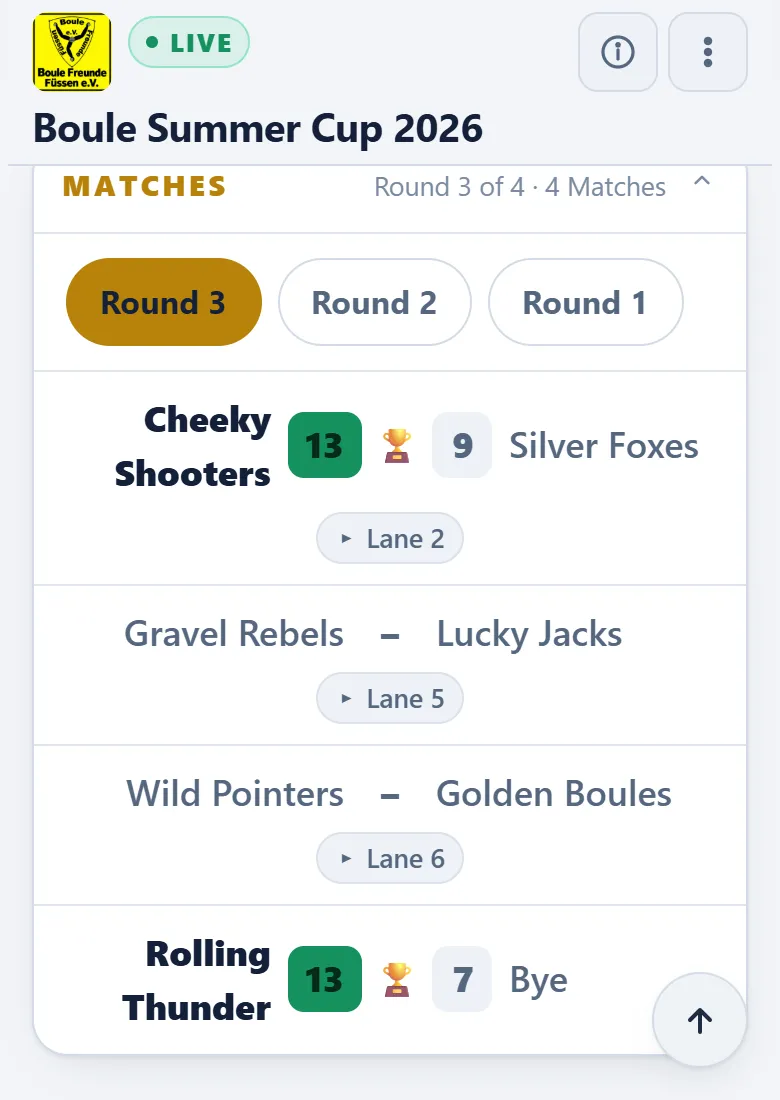
The second screen is the phone everyone already carries. Put the link up as a QR code at the entrance and on the lanes, and post it in the club chat. Anyone who opens it at home can follow the tournament without phoning.
Mind data protection: only names, pairings and results belong on a public page, no phone numbers, no e-mail addresses and nothing about who has paid.
The personal live link
A table with 60 names doesn't answer “Where do I have to go?”. Better is a link that knows the player and shows their match straight away: opponent, lane, sector and the way there. That turns the live view into a player guidance system, and the queue at the tournament desk disappears.
Reporting results by phone without chaos
Results from phones save legwork but need clear rules:
- Pick one route and announce it at the welcome: does everyone report online, are there cards at the desk, or both?
- If both teams report, the cross-check is built in: if both reports match, the result stands. If they contradict each other, someone from the desk goes over.
- Players should not be able to change a reported result afterwards. Corrections go through the tournament desk.
- Keep a paper route for those without a phone.
What Boule-Boy takes off your hands
- Scoreboard: On a Windows computer it runs in its own window on the second screen, with pages for lanes, round progress, standings, trophies, rules, the day's schedule and the site map. An outdoor contrast mode helps in sunshine, and an edge adjustment fixes cropped pictures. Results appear the moment they are entered.
- TVs: On Fire TV and Android smart TVs the Android app shows the scoreboard; on LG or Samsung TVs it runs in the browser via www.bouleboy.de/tafel.
- Public live view: In the browser, with no app and no account, in German, English and French. Nothing is published automatically; e-mail, phone, photos, notes and payment status stay private. After check-in, “Send live link” e-mails the address to every checked-in team with an e-mail address.
- Personal live link: Players who register online receive it by e-mail; everyone else gets it from you as a QR code, link or e-mail. It shows “My match” with opponent, sector and lane, and lets the player report the result or call the umpire.
- Result reporting: By team card, online by the players, or both. Players cannot change a result once reported. Reports from both teams are brought together; if they match, you accept them with a single click, and any contradiction stands out at once. For players without online registration there are report slips with a QR code per match.
- Without internet: The tournament and the scoreboard run offline. The laptop can serve the live view on its own Wi-Fi so phones on that network can watch. Reporting results from a phone, however, needs the internet.
Take a look at the live view of a demo tournament. Details are in the guide under Public web view and Live link for a player (German).
Try it for free
Create a tournament, switch on the live view and open the link on your phone.
Try it for free →Create a club